Query Analysis
Catch SQL type errors at test time, not runtime.
Query Analysis verifies that your code's types match what the database expects, before your code runs in production. Inspired by doobie's type checking.
Query Analysis relies on metadata reported by each database's JDBC driver, and not all drivers report equally well. Column type checking works everywhere, but parameter type checking and nullability checking vary. See Database Behavior for the full breakdown.
The problem
JDBC gives you no compile-time or test-time feedback about your queries. Errors show up as:
ClassCastExceptionin production- Silent data truncation
NullPointerExceptionfrom nullable columns you forgot about- Mysterious "wrong number of parameters" errors
The solution
Query Analysis uses JDBC metadata to verify your queries against the actual database schema. It compares vendor type names (int4, varchar, timestamptz) directly. Run it in your test suite to catch:
- Parameter types don't match — You're passing a String where the database expects an Integer
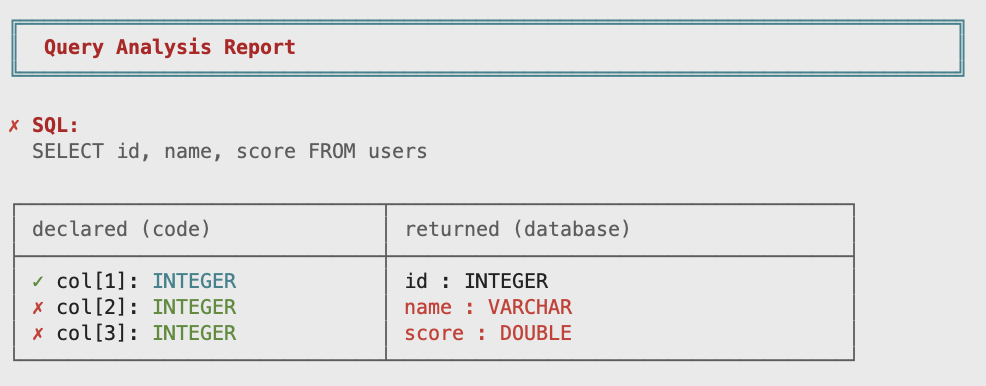
- Column types don't match — Your RowCodec expects a timestamp but the column is a date
- Nullability is wrong — The column is nullable but your type isn't Optional
- Counts are off — Your RowCodec expects 5 columns but the query returns 4
Queries built with the optionally DSL are expanded into all 2N branch variants and verified individually. Every possible runtime SQL shape is checked, including ones your test never happened to construct. See Dynamic Queries for the trade-offs against list-based composition.
Basic usage
AnalyzableScanner scans a package and discovers every query and operation. QueryChecker verifies them all against the database. One test covers your entire data layer:
- Kotlin
- Java
- Scala
fun allQueriesTypeCheck() {
    val analyzables = AnalyzableScanner.scan("com.myapp.db")
    val checker = QueryChecker.create(transactor)
    checker.checkAll(analyzables)
}
void allQueriesTypeCheck() {
  var analyzables = AnalyzableScanner.scan("com.myapp.db");
  QueryChecker checker = QueryChecker.create(transactor);
  checker.checkAll(analyzables);
}
def allQueriesTypeCheck(): Unit =
  val analyzables = AnalyzableScanner.scan("com.myapp.db")
  val checker = QueryChecker.create(transactor)
  checker.checkAll(analyzables)
Add a new query anywhere in the package, and it's automatically included in the next test run. No manual list maintenance.
What the scanner discovers
The scanner finds everything that returns an Analyzable type (OperationRead and Operation). It discovers both fields and methods:
- Kotlin
- Java
- Scala
// Properties — discovered automatically
val allCities: OperationRead<List<City>> =
    Fragment.of("SELECT id, name FROM cities")
        .query(cityCodec.all())

// No-arg methods — discovered automatically
fun activeCities(): OperationRead<List<City>> =
    Fragment.of("SELECT id, name FROM cities WHERE active")
        .query(cityCodec.all())

// Methods with parameters — dummy arguments constructed automatically
fun findByName(name: String): OperationRead<City?> =
    Fragment.of("SELECT id, name FROM cities WHERE name = ")
        .value(PgTypes.text, name)
        .query(cityCodec.maxOne())

// Methods with primitive arguments are also handled
fun findById(id: Int): OperationRead<City?> =
    Fragment.of("SELECT id, name FROM cities WHERE id = ")
        .value(PgTypes.int4, id)
        .query(cityCodec.maxOne())
// Fields — discovered automatically
final OperationRead<List<City>> allCities =
    Fragment.of("SELECT id, name FROM cities").query(cityCodec.all());

// No-arg methods — discovered automatically
OperationRead<List<City>> activeCities() {
  return Fragment.of("SELECT id, name FROM cities WHERE active").query(cityCodec.all());
}

// Methods with parameters — dummy arguments constructed automatically
OperationRead<Optional<City>> findByName(String name) {
  return Fragment.of("SELECT id, name FROM cities WHERE name = ")
      .value(PgTypes.text, name)
      .query(cityCodec.maxOne());
}

// Methods with primitive arguments are also handled — the scanner picks 0,
// false, "", etc. for the dummy invocation.
OperationRead<Optional<City>> findById(int id) {
  return Fragment.of("SELECT id, name FROM cities WHERE id = ")
      .value(PgTypes.int4, id)
      .query(cityCodec.maxOne());
}
// Fields — discovered automatically
val allCities: OperationRead[List[City]] =
  Fragment
    .of("SELECT id, name FROM cities")
    .query(cityCodec.all())

// No-arg methods — discovered automatically
def activeCities(): OperationRead[List[City]] =
  Fragment
    .of("SELECT id, name FROM cities WHERE active")
    .query(cityCodec.all())

// Methods with parameters — dummy arguments constructed automatically
def findByName(name: String): OperationRead[Option[City]] =
  Fragment
    .of("SELECT id, name FROM cities WHERE name = ")
    .value(PgTypes.text, name)
    .query(cityCodec.maxOne())

// Methods with primitive arguments are also handled
def findById(id: Int): OperationRead[Option[City]] =
  Fragment
    .of("SELECT id, name FROM cities WHERE id = ")
    .value(PgTypes.int4, id)
    .query(cityCodec.maxOne())
Discovery rules
| What | How it's found |
|---|---|
| Instance fields | Any field whose type implements Analyzable |
| Instance methods (no args) | Called directly, return value collected |
| Instance methods with parameters | Dummy arguments constructed automatically, method invoked |
| Static fields | Discovered — useful for Kotlin top-level val, Java static final OperationRead, and static helper bags |
| Static methods (no args, with args) | Discovered — same dummy-argument construction as instance methods |
| Private / protected / package-private members | Discovered — the scanner uses setAccessible(true) since it's a test-scope tool |
Class instantiation
The scanner handles all three JVM languages:
| Source | How it's found |
|---|---|
| Java classes | Instantiated via no-arg constructor (or Transactor constructor). Fields and methods are scanned. |
| Kotlin classes | Same as Java — instantiated via no-arg constructor. Properties and methods are scanned. |
| Kotlin objects | Discovered via INSTANCE singleton. Properties and methods are scanned. |
| Scala classes | Same as Java — instantiated via no-arg constructor. Fields and methods are scanned. |
| Scala objects | Discovered via MODULE$ singleton. Fields and methods are scanned. |
The scanner recurses into subpackages, so scan("com.myapp") finds queries in com.myapp.users, com.myapp.orders, etc.
Each discovered query is automatically named ClassName.fieldName or ClassName.methodName (e.g. UserRepo.findById), so error reports pinpoint exactly which query failed.
For classes that need a database connection at construction time, pass a Transactor to the scanner:
AnalyzableScanner.scan("com.myapp.db", transactor)
The scanner will try constructors that accept a Transactor parameter.
Dummy arguments
When the scanner encounters a method with parameters, it constructs dummy values to invoke the method. The actual argument values don't matter; the scanner only needs the method's return value (an OperationRead or Operation) to extract SQL and type information. If a method branches on its arguments and returns structurally different operations, use manual() directives to provide meaningful values.
The scanner can construct dummies for:
| Type | Dummy value |
|---|---|
Primitives (int, boolean, etc.) | Default values (0, false, etc.) |
String | "" |
BigDecimal, BigInteger | ZERO |
UUID | new UUID(0, 0) |
LocalDate, Instant, etc. | Epoch / 2000-01-01 |
Optional, List, Set, Map | Empty |
| Arrays | Empty array |
| Enums | First constant |
| Records | Recursive construction of components |
| Classes with constructors | Tries shortest constructor first |
If a parameter type can't be constructed (e.g., an interface like Runnable, or an abstract class), the scanner will fail with an error. Handle these methods explicitly using Scan Directives: either skip() to exclude them or manual() to provide the arguments yourself.
Getter deduplication
In Kotlin and Scala, properties generate both a backing field and a getter method. The scanner automatically deduplicates these: if a field named query exists, a no-arg method named query() (Scala-style) or getQuery() (Kotlin-style) is treated as a getter and skipped.
Methods with parameters are never treated as getters, even if they share a name with a field.
Scan directives
When the scanner encounters a method it can't auto-invoke, it fails with an error telling you which method and why. Scan directives tell the scanner how to handle these methods.
skip(): exclude a method
Use skip() when a method shouldn't be type-checked at all:
- Kotlin
- Java
- Scala
fun checkWithDirectives() {
    val analyzables = AnalyzableScanner.scan(
        "com.myapp.reports",

        // Skip a method entirely — it won't be type-checked
        skip(ReportRepo::class.java, "generateReport")
    )

    val checker = QueryChecker.create(transactor)
    checker.checkAll(analyzables)
}
void checkWithDirectives() {
  var analyzables =
      AnalyzableScanner.scan(
          "com.myapp.reports",

          // Skip a method entirely — it won't be type-checked
          ScanDirective.skip(ReportRepo.class, "generateReport"));

  QueryChecker checker = QueryChecker.create(transactor);
  checker.checkAll(analyzables);
}
def checkWithDirectives(): Unit =
  val analyzables = AnalyzableScanner.scan(
    "com.myapp.reports",

    // Skip a method entirely — it won't be type-checked
    AnalyzableScanner.skip(classOf[ReportRepo], "generateReport")
  )

  val checker = QueryChecker.create(transactor)
  checker.checkAll(analyzables)
manual(): provide specific arguments
Use manual() when you want a method to be type-checked but the scanner can't construct the right arguments. You provide a variant name, call the method yourself, and pass the result:
- Kotlin
- Java
- Scala
fun checkWithManualDirective() {
    val repo = ReportRepo()

    val analyzables = AnalyzableScanner.scan(
        "com.myapp.reports",

        // Provide specific arguments for a method
        manual(
            ReportRepo::class.java, "filteredReport", "defaults",
            repo.filteredReport(ReportRepo.ReportFilter("all", 100)))
    )

    val checker = QueryChecker.create(transactor)
    checker.checkAll(analyzables)
}
void checkWithManualDirective() {
  var repo = new ReportRepo();

  var analyzables =
      AnalyzableScanner.scan(
          "com.myapp.reports",

          // Provide specific arguments for a method
          ScanDirective.manual(
              ReportRepo.class,
              "filteredReport",
              "defaults",
              repo.filteredReport(new ReportRepo.ReportFilter("all", 100))));

  QueryChecker checker = QueryChecker.create(transactor);
  checker.checkAll(analyzables);
}
def checkWithManualDirective(): Unit =
  val repo = ReportRepo()

  val analyzables = AnalyzableScanner.scan(
    "com.myapp.reports",

    // Provide specific arguments for a method
    AnalyzableScanner.manual(classOf[ReportRepo], "filteredReport", "defaults", repo.filteredReport(ReportFilter("all", 100)))
  )

  val checker = QueryChecker.create(transactor)
  checker.checkAll(analyzables)
You can provide multiple manual variants for the same method. Each gets its own type check:
ScanDirective.manual(repo::search, "by-name", new Filter("alice", 10)),
ScanDirective.manual(repo::search, "all", new Filter("", 100))
Each variant appears in reports as ClassName.methodName[variantName].
instance(): add objects from outside the scan package
Use instance() to include objects that live outside the scanned package, or that need special construction:
- Kotlin
- Java
- Scala
fun checkWithExternalObjects() {
    val external = ExternalRepo()

    val analyzables = AnalyzableScanner.scan(
        "com.myapp.db",

        // Add an object from outside the scanned package
        instance(external),

        // Add with per-instance overrides
        instance(external) {
            skip(ExternalRepo::class.java, "generateReport")
        }
    )

    val checker = QueryChecker.create(transactor)
    checker.checkAll(analyzables)
}
void checkWithExternalObjects() {
  var external = new ExternalRepo();

  var analyzables =
      AnalyzableScanner.scan(
          "com.myapp.db",

          // Add an object from outside the scanned package
          ScanDirective.instance(external),

          // Add with per-instance overrides
          ScanDirective.instance(
              external,
              (inst, cfg) -> {
                cfg.skip(ExternalRepo.class, "generateReport");
              }));

  QueryChecker checker = QueryChecker.create(transactor);
  checker.checkAll(analyzables);
}
def checkWithExternalObjects(): Unit =
  val external = ExternalRepo()

  val analyzables = AnalyzableScanner.scan(
    "com.myapp.db",

    // Add an object from outside the scanned package
    AnalyzableScanner.instance(external),

    // Add with per-instance overrides
    AnalyzableScanner.instance(external) { scope =>
      scope.skip(classOf[ExternalRepo], "generateReport")
    }
  )

  val checker = QueryChecker.create(transactor)
  checker.checkAll(analyzables)
The instance() directive also supports per-instance overrides: skip or provide manual entries for specific methods on that instance.
Manual check
Some queries can't be discovered by the scanner: queries built dynamically inside methods, or queries in classes that require constructor arguments the scanner can't provide. Use checker.check() to verify these individually:
- Kotlin
- Java
- Scala
fun checkQueryManually() {
    val query: OperationRead.Query<List<User>> =
        sql { """
            SELECT id, name, email
            FROM users
            WHERE id = ${PgTypes.int4(1)}
        """ }
            .query(userRowCodec.all())

    val checker = QueryChecker.create(transactor)
    checker.check(query)
}
void checkQueryManually() {
  var query =
      Fragment.of(
              """
              SELECT id, name, email
              FROM users WHERE id =
              """)
          .value(PgTypes.int4, 1)
          .query(userRowCodec.all());

  QueryChecker checker = QueryChecker.create(transactor);
  checker.check(query);
}
def checkQueryManually(): Unit =
  val query =
    sql"""SELECT id, name, email
          FROM users
          WHERE id = ${PgTypes.int4(1)}"""
      .query(userRowCodec.all())

  val checker = QueryChecker.create(transactor)
  checker.check(query)
Named queries
Give your queries names for clearer error reports:
- Kotlin
- Java
- Scala
fun analyzeNamedQuery() {
    val query =
        sql { """
            SELECT id, name, email
            FROM users
            WHERE id = ${PgTypes.int4(userId)}
        """ }
            .query(userRowCodec.all())
            .named("findUserById")

    // The name shows up in the error report
    val analysis =
        QueryAnalyzer.analyze(query, connection)
            .single()

    if (!analysis.succeeded()) {
        throw AssertionError(analysis.report())
    }
}
void analyzeNamedQuery() {
  var query =
      Fragment.of(
              """
              SELECT id, name, email
              FROM users WHERE id =
              """)
          .value(PgTypes.int4, userId)
          .query(userRowCodec.all())
          .named("findUserById");

  // The name shows up in the error report
  QueryAnalysis analysis = QueryAnalyzer.analyze(query, connection).getFirst();

  if (!analysis.succeeded()) {
    throw new AssertionError(analysis.report());
  }
}
def analyzeNamedQuery(connection: Connection): Unit =
  val query =
    sql"""SELECT id, name, email
          FROM users
          WHERE id = ${PgTypes.int4(userId)}"""
      .query(userRowCodec.all())
      .named("findUserById")

  // The name shows up in the error report
  val analysis =
    QueryAnalyzer.analyze(query, connection).head

  if !analysis.succeeded() then throw AssertionError(analysis.report())
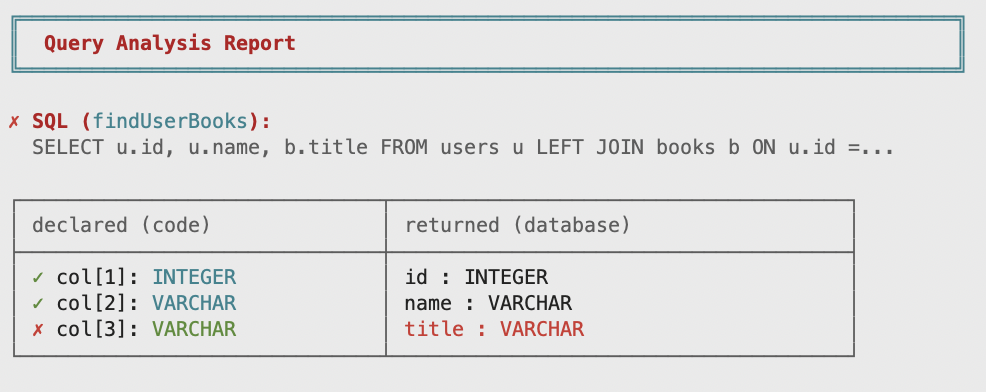
Named queries show the name in the report header, making it easy to find which query failed in a large test suite. The scanner names queries automatically (ClassName.fieldName), so naming is mainly useful for manual checks.
Reading the report
When analysis fails, you get a detailed report showing exactly what went wrong:
╔══════════════════════════════════════════════════════════════════════════════╗
║  Query Analysis Report                                                       ║
╚══════════════════════════════════════════════════════════════════════════════╝

SQL (findUserById):
  SELECT id, name, created_at, status FROM users WHERE id = ?

┌─ Parameters ─────────────────────────────────────────────────────────────────┐
│  ✓ param[1]: int4                 → int4                                     │
└──────────────────────────────────────────────────────────────────────────────┘

┌─ Columns ────────────────────────────────────────────────────────────────────┐
│  ✓ col[1]: int4                   → id : int4                                │
│  ✓ col[2]: text                   → name : varchar                           │
│  ✗ col[3]: int4                   → created_at : timestamptz                 │
│  ✗ col[4]: (missing)              → status : varchar                         │
└──────────────────────────────────────────────────────────────────────────────┘

✗ 2 error(s) found:

  1. Column 3 'created_at': type mismatch
     │ Declared: int4 (accepts: int4)
     │ Returned: timestamptz
     └ The declared type does not match the returned vendor type "timestamptz"

  2. Column 4 'status' is returned by query (varchar) but not declared in RowCodec
Error types
Parameter type mismatch
When you pass a parameter of the wrong type:
Parameter 1: type mismatch
  │ Declared: text (accepts: text)
  │ Expected: int4
  └ The declared type does not match the expected vendor type "int4"
Fix: Change the parameter type to match what the database expects.
Column type mismatch
When your RowCodec expects a different type than the database returns:
Column 2 'price': type mismatch
  │ Declared: int4 (accepts: int4)
  │ Returned: numeric
  └ The declared type does not match the returned vendor type "numeric"
Fix: Use the correct DbType in your RowCodec. Here, use PgTypes.numeric instead of PgTypes.int4.
Nullability mismatch
When a nullable column isn't wrapped in Optional:
Column 3 'email': nullability mismatch
  │ The database says this column is nullable
  │ But the type text is not Optional
  └ Use .opt() to make the type nullable, .nullableOk() to suppress this warning,
    or ensure the column is NOT NULL
Fix: Use .opt() on the type: PgTypes.text.opt() instead of PgTypes.text. Or use .nullableOk() if you know it's safe (see Escape Hatches).
Missing column
When your RowCodec expects more columns than the query returns:
Column 5 is declared in RowCodec (boolean) but not returned by query
Fix: Either add the missing column to your SELECT, or remove it from your RowCodec.
Extra column
When the query returns more columns than your RowCodec expects:
Column 4 'updated_at' is returned by query (timestamptz) but not declared in RowCodec
Fix: Either add the column to your RowCodec, or remove it from your SELECT.
Escape hatches
Two escape hatches let you selectively relax checking:
.nullableOk(): suppress nullability warnings
Use when you know a column won't be null in practice, even though the database says it could be. Common with outer joins:
- Kotlin
- Java
- Scala
data class OrderRow(val userId: Int, val userName: String, val orderTotal: BigDecimal)

// The LEFT JOIN makes o.total nullable in the result set,
// but .nullableOk() tells analysis we'll handle it
val orderCodec: RowCodec<OrderRow> =
    RowCodec.builder<OrderRow>()
        .field(PgTypes.int4, OrderRow::userId)
        .field(PgTypes.text, OrderRow::userName)
        .field(PgTypes.numeric.nullableOk(), OrderRow::orderTotal)
        .build(::OrderRow)

fun analyzeLeftJoin() {
    val query =
        sql { """
            SELECT u.id, u.name, o.total
            FROM users u
            LEFT JOIN orders o ON u.id = o.user_id
        """ }
            .query(orderCodec.all())

    val analysis: QueryAnalysis =
        QueryAnalyzer.analyze(query, connection).single()
    if (!analysis.succeeded()) {
        throw AssertionError(analysis.report())
    }
}
record OrderRow(int userId, String userName, BigDecimal orderTotal) {}

// The LEFT JOIN makes o.total nullable in the result set,
// but .nullableOk() tells analysis we'll handle it
RowCodec<OrderRow> orderCodec =
    RowCodec.<OrderRow>builder()
        .field(PgTypes.int4, OrderRow::userId)
        .field(PgTypes.text, OrderRow::userName)
        .field(PgTypes.numeric.nullableOk(), OrderRow::orderTotal)
        .build(OrderRow::new);

void analyzeLeftJoin() {
  var query =
      Fragment.of(
              """
              SELECT u.id, u.name, o.total
              FROM users u
              LEFT JOIN orders o ON u.id = o.user_id
              """)
          .query(orderCodec.all());

  QueryAnalysis analysis = QueryAnalyzer.analyze(query, connection).getFirst();
  if (!analysis.succeeded()) {
    throw new AssertionError(analysis.report());
  }
}
case class OrderRow(
    userId: Int,
    userName: String,
    orderTotal: BigDecimal
)

// LEFT JOIN makes o.total nullable in the result set,
// but .nullableOk() tells analysis we'll handle it
val orderCodec: RowCodec[OrderRow] =
  RowCodec
    .builder[OrderRow]()
    .field(PgTypes.int4)(_.userId)
    .field(PgTypes.text)(_.userName)
    .field(PgTypes.numeric.nullableOk())(_.orderTotal)
    .build(OrderRow.apply)

def analyzeLeftJoin(connection: Connection): Unit =
  val query =
    sql"""SELECT u.id, u.name, o.total
          FROM users u
          LEFT JOIN orders o ON u.id = o.user_id"""
      .query(orderCodec.all())

  val analysis: QueryAnalysis =
    QueryAnalyzer.analyze(query, connection).head
  if !analysis.succeeded() then throw AssertionError(analysis.report())
.unchecked(): skip type checking entirely
Use when you know the type is correct but the database metadata disagrees, or for computed columns with unpredictable types:
- Kotlin
- Java
- Scala
data class Stats(val name: String, val count: Int)

// .unchecked() skips type checking entirely for this column
val statsCodec: RowCodec<Stats> =
    RowCodec.builder<Stats>()
        .field(PgTypes.text, Stats::name)
        .field(PgTypes.int4.unchecked(), Stats::count)
        .build(::Stats)
record Stats(String name, int count) {}

// .unchecked() skips type checking entirely for this column
RowCodec<Stats> statsCodec =
    RowCodec.<Stats>builder()
        .field(PgTypes.text, Stats::name)
        .field(PgTypes.int4.unchecked(), Stats::count)
        .build(Stats::new);
case class Stats(name: String, count: Int)

// .unchecked() skips type checking entirely for this column
val statsCodec: RowCodec[Stats] = RowCodec
  .builder[Stats]()
  .field(PgTypes.text)(_.name)
  .field(PgTypes.int4.unchecked())(_.count)
  .build(Stats.apply)
Routine analysis
Verify stored procedures and functions against the database:
- Kotlin
- Java
- Scala
// Verify a stored function matches the database definition
fun checkStoredFunction() {
    val addUser = DbFunction.define("add_user", PgTypes.int4)
        .input(PgTypes.text)
        .input(PgTypes.text)
        .build()

    val checker = QueryChecker.create(transactor)
    checker.checkRoutine(addUser)
}
// Verify a stored function matches the database definition
void checkStoredFunction() {
  var addUser =
      Procedure.buildFunction(
          "add_user",
          List.of(ParamDef.input(PgTypes.text), ParamDef.input(PgTypes.text)),
          PgTypes.int4);

  QueryChecker checker = QueryChecker.create(transactor);
  checker.checkRoutine(addUser);
}
// Verify a stored function matches the database
def checkStoredFunction(): Unit =
  val addUser = Procedure.buildFunction(
    "add_user",
    java.util.List.of(
      ParamDef.input(PgTypes.text),
      ParamDef.input(PgTypes.text)
    ),
    PgTypes.int4
  )

  val checker: QueryChecker =
    QueryChecker.create(transactor)
  checker.checkRoutine(addUser)
Routine analysis checks:
- The routine exists in the database
- Parameter count matches
- Parameter types match (by vendor type name)
- Parameter modes match (IN, OUT, INOUT)
- Return type matches (for functions)
Analyzing composed operations
When you compose operations with .combine()/.combineWith(), .then(), or OperationRead.ifEmpty(), the checker walks the entire operation tree and verifies every SQL statement:
- Kotlin
- Java
- Scala
fun analyzeComposedOperation() {
    val transaction: Operation<*> =
        insertUser("Alice").productL(allUsers)

    // Analyze every SQL statement in the tree — one call
    val results: List<QueryAnalysis> =
        QueryAnalyzer.analyze(transaction, conn)

    for (analysis in results) {
        if (!analysis.succeeded()) {
            System.err.println(analysis.report())
        }
    }
}
void analyzeComposedOperation() {
  Operation<?> transaction = insertUser("Alice").productL(allUsers);

  // Analyze every SQL statement in the tree
  List<QueryAnalysis> results = QueryAnalyzer.analyze(transaction, conn);

  for (var analysis : results) {
    if (!analysis.succeeded()) {
      System.err.println(analysis.report());
    }
  }
}
def analyzeComposedOperation(conn: Connection): Unit =
  val transaction: Operation[?] =
    insertUser("Alice").productL(allUsers)

  // Analyze every statement in the tree
  val results: List[QueryAnalysis] =
    QueryAnalyzer.analyze(transaction, conn)

  for analysis <- results do if !analysis.succeeded() then System.err.println(analysis.report())
This returns one QueryAnalysis per SQL statement found in the tree.
Dynamic SQL analysis
When a fragment uses .optionally(), analysis automatically expands all 2^N structural variants. Each variant is prepared against the database and verified independently.
For example, an operation with 3 optional predicates produces 8 combinations — all checked with a single checker.check() call:
| name filter | email filter | active flag | SQL WHERE clause |
|---|---|---|---|
| absent | absent | absent | WHERE 1=1 ORDER BY name |
| present | absent | absent | WHERE 1=1 AND name ILIKE ? ORDER BY name |
| absent | present | absent | WHERE 1=1 AND email ILIKE ? ORDER BY name |
| present | present | absent | WHERE 1=1 AND name ILIKE ? AND email ILIKE ? ORDER BY name |
| absent | absent | present | WHERE 1=1 AND active = TRUE ORDER BY name |
| present | absent | present | WHERE 1=1 AND name ILIKE ? AND active = TRUE ORDER BY name |
| absent | present | present | WHERE 1=1 AND email ILIKE ? AND active = TRUE ORDER BY name |
| present | present | present | WHERE 1=1 AND name ILIKE ? AND email ILIKE ? AND active = TRUE ORDER BY name |
If any variant has a type error, the analysis report tells you exactly which combination failed and why.
Further reading
- Query Analysis: Database Behavior — detailed breakdown of what each database's JDBC driver reports and how it affects analysis