Getting Started
A step-by-step introduction to Foundations JDBC. The library is MIT-licensed and open source.
Dependencies
Pick the one dependency for your language:
- Java
- Kotlin
- Scala
implementation("dev.typr.foundations:foundations-jdbc:1.0.0-RC1")
<dependency>
    <groupId>dev.typr.foundations</groupId>
    <artifactId>foundations-jdbc</artifactId>
    <version>1.0.0-RC1</version>
</dependency>
implementation("dev.typr.foundations:foundations-jdbc-kotlin:1.0.0-RC1")
<dependency>
    <groupId>dev.typr.foundations</groupId>
    <artifactId>foundations-jdbc-kotlin</artifactId>
    <version>1.0.0-RC1</version>
</dependency>
implementation("dev.typr.foundations:foundations-jdbc-scala_3:1.0.0-RC1")
<dependency>
    <groupId>dev.typr.foundations</groupId>
    <artifactId>foundations-jdbc-scala_3</artifactId>
    <version>1.0.0-RC1</version>
</dependency>
The Kotlin and Scala modules depend on the core transitively, so one dependency is enough.
Imports
- Java
- Kotlin
- Scala
import dev.typr.foundations.*;           // Core: Fragment, RowCodec, OperationRead, Transactor, *Types
import dev.typr.foundations.connect.*;    // Connection: ConnectionSource, *Config
import dev.typr.foundations.data.*;       // Data types: Json, Range, Uint4, etc.
import dev.typr.foundationskt.*         // Core: Fragment, RowCodec, OperationRead, Transactor, *Types
import dev.typr.foundationskt.connect.* // Connection: ConnectionSource, *Config
import dev.typr.foundationskt.data.*    // Data types: Json, Range, Uint4, etc.
import dev.typr.foundationssc.*         // Core: Fragment, RowCodec, OperationRead, Transactor, *Types
import dev.typr.foundationssc.connect.* // Connection: ConnectionSource, *Config
import dev.typr.foundationssc.data.*    // Data types: Json, Range, Uint4, etc.
Setting up a connection
The quickest way to get started is with DuckDB in-memory. DuckDB is an embedded database that requires no Docker, no server, and no setup. Add the dependency and go:
- Kotlin
- Java
- Scala
val tx: Transactor =
    ConnectionSource.of(DuckDbConfig.inMemory().build())
        .transactor()

val result: Int = sql { "SELECT 42" }
    .queryExactlyOne(DuckDbTypes.integer)
    .transact(tx)
Transactor tx = ConnectionSource.of(DuckDbConfig.inMemory().build()).transactor();

int result = Fragment.of("SELECT 42").queryExactlyOne(DuckDbTypes.integer).transactRead(tx);
val tx: Transactor =
  ConnectionSource
    .of(DuckDbConfig.inMemory().build())
    .transactor()

val result: Int = sql"SELECT 42"
  .queryExactlyOne(DuckDbTypes.integer)
  .transact(tx)
For production connection setup with PostgreSQL, MariaDB, and other databases, see Transactors.
Your first query
Define a record, a row codec that maps columns to fields, and a query that returns typed results:
- Kotlin
- Java
- Scala
data class City(val name: String, val population: Int)

val cityCodec: RowCodecNamed<City> =
    RowCodec.namedBuilder<City>()
        .field("name", DuckDbTypes.varchar, City::name)
        .field("population", DuckDbTypes.integer, City::population)
        .build(::City)

val findCities: OperationRead<List<City>> =
    sql { "SELECT ${cityCodec.columnList} FROM city ORDER BY population DESC" }
        .query(cityCodec.all())
record City(String name, int population) {}

static final RowCodecNamed<City> cityCodec =
    RowCodec.<City>namedBuilder()
        .field("name", DuckDbTypes.varchar, City::name)
        .field("population", DuckDbTypes.integer, City::population)
        .build(City::new);

static final OperationRead<List<City>> findCities =
    Fragment.of("SELECT ")
        .append(cityCodec.columnList())
        .append(" FROM city ORDER BY population DESC")
        .query(cityCodec.all());
case class City(name: String, population: Int)

val cityCodec: RowCodecNamed[City] = RowCodec
  .namedBuilder[City]()
  .field("name", DuckDbTypes.varchar)(_.name)
  .field("population", DuckDbTypes.integer)(_.population)
  .build(City.apply)

val findCities: OperationRead[List[City]] =
  sql"SELECT ${cityCodec.columnList} FROM city ORDER BY population DESC"
    .query(cityCodec.all())
The RowCodecNamed maps database columns to record fields by name. Use .all() to collect all rows, .exactlyOne() for a single result, or .maxOne() for an optional result. See Row Codecs for more.
Parameterized queries
Use your types and codecs in a plain function to build parameterized queries:
- Kotlin
- Java
- Scala
fun findCityByName(name: String): OperationRead<City?> =
    sql { "SELECT ${cityCodec.columnList} FROM city WHERE name = ${DuckDbTypes.varchar(name)}" }
        .query(cityCodec.maxOne())
static OperationRead<Optional<City>> findCityByName(String name) {
  return Fragment.of("SELECT ")
      .append(cityCodec.columnList())
      .append(" FROM city WHERE name = ")
      .value(DuckDbTypes.varchar, name)
      .query(cityCodec.maxOne());
}
def findCityByName(name: String): OperationRead[Option[City]] =
  sql"SELECT ${cityCodec.columnList} FROM city WHERE name = ${DuckDbTypes.text(name)}"
    .query(cityCodec.maxOne())
Values are always bound as JDBC parameters, never concatenated into SQL strings.
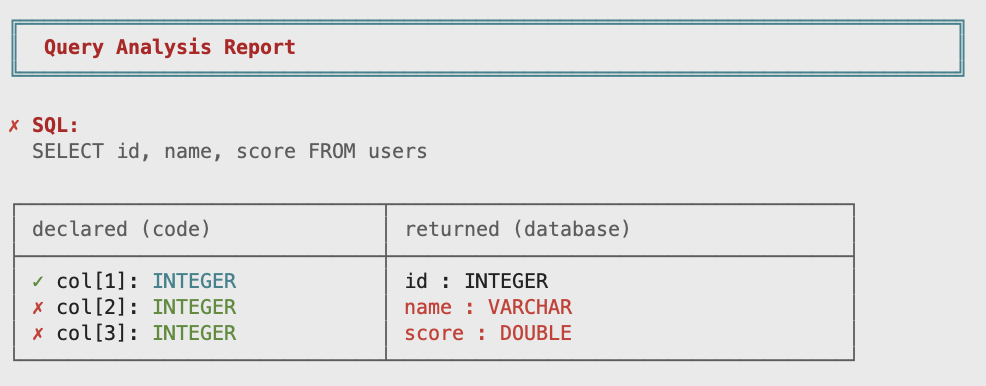
Query analysis
Query Analysis catches type mismatches, nullability errors, and missing columns at test time:
What's next

Continue reading: Fragments → Row Codecs → Operations → Transactors → Query Analysis
Jump to a topic: Database Types (type catalog) · Dynamic Queries (optional filters & conditional clauses)
Full examples
example-kotlin— DuckDB with domain types, repositories, services, and query analysisexample-spring-boot— Java Spring Boot with HikariCP connection pooling